Last Godot 3 update time! And because I don’t want to rebuild the old website atm, I’ll just put the various fixes here. Do remember, this is a maintenance update to the old Godot 3 version. And moreover, it’s the last, in theory. The gamejam in april did bring several people together and made all of us do some quick fixes, which are now integrated. I haven’t tested this in depth, just some basic “seems to be in order” checks.
If you did change castagne files during the jam for example, make a backup before updating as it will override the folder. I recommend then merging manually with a tool like meld. You can also do the update from the git repo itself if you have a git tool installed.
If people are adding more fixes, I can integrate them but for me that’s the last I’ll be working on the Godot 3 version, I am more in the process of porting my own projects to the new one. Here’s the list of changes:
CantDash flag.Armor flag which makes blockstun not happen, and calls the OnArmor state instead and raises the ArmorPunish flag on the next frame.NoVFX and NoShake attack flags to remove some of the effects.NoGroundTech attack flag which prevents teching from happening once on the ground.Another estival update! If the text before is dry, it’s because you haven’t interacted enough and I don’t have anything to change.
Bit of a delay with the last one but there’s a good reason: i forgor
Big subject, and one we actually talked a lot about in the previous update on docs! There’s still a lot to say, and this time I’ll focus more on the beginner focused parts and how they are handled.
Castagne is a software meant for experts, but there’s not many of them and you need a path to become efficient in Castagne. As such, the previous definition of beginner was something simpler: someone who doesn’t know Castagne yet, and might be less technical in general. However, in practice, that’s not the correct definition to use, and the people coming into Castagne have been quite varied. Let’s review some assumptions on beginner’s knowledge:
Sidenote, I use “surprisingly” a lot in these because I haven’t been a beginner in gamedev for a long while, and my journey was different enough that I don’t have proper reference points. I learned programming and 3D modeling through basic curiosity and looking online, before I even learned English. When I started gamedev 5 years later, I already had those core skills available so it wasn’t that big of a climb, and soon after I got a short internship at a gamedev studio so I started using Unity back in 2011 or so. I still have that propensity to not be intimidated by walls of knowledge even outside of my field, so my first reaction is not “give up” but “read more”, which definitely puts me outside of most users afaik, which makes it harder to project. Maybe you already guessed who would use Castagne and the level of beginners, but I did not lol
The question then becomes, how far should Castagne go to support beginners? Each one has their own profile, so different aspects are needed, and some decisions can impair the software for other purposes. So let’s put in a guiding vision: Castagne will always prioritize the expert experience and efficiency over the beginner one and prefer teaching and rising the level to limiting or over-simplifying. This doesn’t mean excluding beginners, but there’s a lot of ways you can make something simple by making most choices for the user, or making the day-to-day workflow worse. That’s a pitfall I wanted to avoid in Castagne: Castagne is not training wheels, it aims to be a supremely strong option on the ways it focuses on.
This means that Castagne’s approach is to teach, which takes time and effort both on Castagne’s side and the user’s side. As such, this brings a fundamental limit to Castagne’s user: the user must be willing to learn. If someone just wants to quickly and casually do a fighting game, Castagne is not the software suited for that, and we shouldn’t use resources to get them. The decisions needed to support that user are going to make the software worse for its target users. Another constraint is going to be you need to know how to use a computer. If you can’t open Castagne, you’re going to be immediately lost as soon as the words “import assets” appear on the screen. This already puts some limits, but it still leaves a lot open. Who should Castagne reach out to?
I believe that Castagne should try to reach out of complete beginners, in part because it’s who it’s attracting already, and because it’s good software that is not a trap. This means that people will be able to learn Castagne and be able to keep using it, which will give us better games, and a more skilled community, so that the discussions can also raise in level. With the new vision realizing that people won’t look outside of Castagne, the realistic option is to have this handled in part by Castagne. Not fully of course, Castagne is not the place to learn about blender or sorting algorithms, but it shouldn’t leave beginners high and dry. Having this in-engine will also mold the basic beginner to someone that can already understand more and is more aligned with Castagne’s workflow. So, how can we do this?
I propose looking at it through a framework of three skills: Programming, Art, and Design. Each beginner can either have a basic level in that skill, or not have it, and measures can be taken. That’s on top of well, teaching Castagne, it’s more a sort of soft prerequisites that can be accomodated for, especially in the first tutorials. We’re going to assume that once you’re out of the beginner / advanced beginner stage, you’re able to figure stuff out on your own because you have that anchored basis, and can look up tutorials. They are pretty independant, so while that means there’s 8 beginner profiles, we only need to think about those axises independantly.
Adding some branches to the onboarding tutorial specifically could help direct users, and some categories focused on different lengths and how much they are guiding you through things. This is definitely a part that will need iteration. A risk with that is having so much information that the tutorials themselves become intimidating, but at some point you gotta cut people off: these would not be able to figure out the software without them, and I would much prefer a userbase that is able to find how to do things properly to having the forum be a collection of quick hacks.
Another point to keep in mind in beginners that skip tutorials. Those that skip tutorials are handled by the natural documentation and design of Castagne, as well as the Help Me button if they don’t ignore it. No additional effort is going to be made for them: they want to discover things by themselves, so they will be on their own beyond showing them where the tutorials are on first startup. As mentioned earlier, users that don’t want to spend the effort to learn Castagne are not targetted by the software.
I think that’s a good framework to think about that, and a good general plan. Castagne onboarding, albeit flawed, has managed to bring quite a few users up to speed. It’s part of what allowed Castagne to push beyond its target audience already, so an expansion in that early net should help much more people find their first foothold in the engine. After that, the additional tutorials mentioned in the other updates should help raise the level, now that the initial funnel will properly bring people to the level needed to use it. This will ensure the userbase is more advanced and numerous, which will enable development to go further and better.
Also, I’m planning on using the Castagne characters during tutorials to make them more palatable. I guess this makes it less corpo (which is not a bad thing), but I guess I’m in the zeitgeist of the new generation of open source mascots. Just need to add an anime girl somewhere instead of my puns on francophone BD.
Do you think I missed a part of the beginner experience, or that there is a better way to handle them? Next time, I’m going to speak about communication again, but in the other direction: from users to me!
Wow, another estival update! Still got plenty of those until the end of the month.
Documentation is always a big subject in open-source projects, and according to feedback, Castagne’s docs is one of the best, really complete for a project at this stage, and very lacking and obtuse. What gives?
The reality is that, not everybody needs the same docs, and thus they will have very different experiences of it. People that think Castagne’s doc is great is mostly technical people: Castagne functions are all explained, and most of the internal states in CASP have documentation, meaning you don’t need to experiment to understand Castagne. On the other end, someone not as technical will be lost more easily, as the getting started part of the docs is fairly minimal and split. Furthermore, small syntax drift makes docs not always up to date. Let’s talk about how I intend on taking these challenges!
First off, it’s good to know what kind of docs are present in Castagne and what they are needed for and their specific challenges. It’s a complex environment, so this multimodality reflects that.
Access to the tutorials is currently done either from the website (which easily drifts away) and from the engine (which has a janky interface). Drift from reality is a concern, with in-engine tutorials being the easiest to keep in sync since they can be tested, and video being the hardest as they can’t and remaking them is a chore. Keeping docs up to date is a huge issue in programming and takes a lot of time, so it needs to be properly supported in the dev workflow.
That’s why docs have been a concern of the new version from the start. The best way to have docs up to date, is to make it easy to keep them so. As such, here’s a few of the key ways this happens:
This should already fix a lot of the issues, and allows the standalong pages to focus on parts that don’t move much, such as the language specification or engine loop. But this would only improve the content of the docs, which is just one part. The second part is access, and that is just as important for a good tool. So, here’s the way you can access the docs:
As you can imagine, that’s a huge amount of docs to make, and they won’t come in all at once. There’s also still an issue of what should the docs cover, and while I’ll talk more about this in the beginner estival post, at some point you stop being just technical and start going into the more artistic side. Some people have asked questions such as “how to make a move feel good?” and my answer of “add forward momentum to make it feel more powerful” tends to lead to mashslop games and is thus not universal. This is just one of the issues that can rise from the mission of the official tutorials, along with coverage / speed. That’s why in a second phase, a strong focus is going to be put in community tutorials, where you can interface with those tutorials system easily, and be referenced in various ways by the official software. As such, you can now explain to people how your custom proration algorithm works and why it’s good!
There’s other concerns, such as translation of said docs (can you feel the pain already?), but they are not as critical in this stage of the project. There’s also a bit of question over LLMs, which while I don’t like them or intend to shove them in the software for no reason, are often used by people instead of searching or asking, and their use in programming is more widespread than in art. They’ve already scrapped the Castagne docs and can produce CASP code from the tests I’ve done, and the programmatic interface could help local models be aware of what’s going on and thus reduce slop questions. I’m personally not convinced of their use here since Castagne is quite simple in practice, and I think the tutorial will be enough to put users in conscious control which will work faster, but hey if they are already taking my bandwidth they might as well be useful. I’ll take this time to note that I’m refusing the use of AI to write the docs, even though it’s a common use these days, as I want the docs to be quality and accurate. I’ve also got plans in the further future to make smaller vids myself and dev interviews, a bit outside of the general tutorials to make the results more complete.
Finally, a point I’m not going to expand on this time is the example characters. That’s because there’s a lot to say about them, especially at a beginner level, and how they tie into the engine itself. I think the ideas that were tied to them were good, but the execution could be better, which some of the new systems will definitely help with. An early note I’ll do is that there’s going to be several characters, and that they will be integrated into the tutorials both as characters and as examples.
As you can see, there’s a lot to say on docs, and it’s probably more complex than you’ve expected! And I’ve not even covered everything. In truth, such systems are central to software, and Castagne being complex AND a beginner-magnet, its docs need to grow in a way to support that. What would you make tutorials on? Next time, we’ll talk about beginners.
Hey hey! Another estival update / discussion, this time on communication itself. I’m still enjoying my vacation here but it will be good to be back at big computer (my favorite place)
I guess this is not a question in and of itself, but more something that’s on my mind and I want to talk about it, so I guess it’s a question I ask myself lol. After all, we say in French that an engineer’s job has three parts: le savoir-faire (know-how), le faire (do), et le faire savoir (make known). While I’m pretty solid on the first two, le faire savoir has been a bit of a recurring theme, and might be more important than the others lol
At its core it’s a bit of a balancing act with many parameters: you need to be able to be found, but how much you reach out to people is a slider, which people you are targetting, and how much time you spend on doing that versus the software itself. As you can probably tell by all the previous updates, I am a yapper but very much tend to talk technical. While I can explain parts step by step well enough (I’ve been told I’m quite good at making complex knowledge accessible, such as with my line rendering article on my blog), especially if I take the time to properly write articles, I tend to have a “minimum level” and don’t value the same things as most people, so my updates can be a bit dry. I’m definitely not suited to “shiny thing” type of communications for instance lol (this has been an issue for me in computer graphics academia, but that’s a rant for another day).
There’s a big balance to be kept between the speed of development, keeping people updated on it, and promoting it, along with managing my energy level. There’s a reason why video updates have stopped: it’s a fair bit longer to write these videos and the whole uploading and promotion thingy compared to just stream of thought writing I do with these regular updates that you can fetch from RSS. Still, the promotion part is still quite some mental effort, which is why for instance these updates are not posted on twitter / bluesky / mastodon (that and not being home and I don’t wanna bother with it). It very much feels like posting into the void, except on the discord / forum as people actually react and interact with it, please keep on doing that lol
Unfortunately, this is kind of a chicken and egg problem: while other people can communicate on Castagne, they need to be aware of it first and become invested (which I’ll talk more about in a future update), which means someone’s gotta do it. It’s also tricky, considering I’m the source on most of the advances and will remain that way for a bit more (nobody can really communicate on the private software that only lives on my computer lol), and it also sets the tone of the community (which is in a really nice place I think). That’s the kind of thing that will solve itself as the software become available and more people use it, but there’s still a problem to solve in the short-term.
My answer to that is going to be, like most things, programmation. I actually enjoy writing these updates themselves (although translating is a chore), but the annoying part is all the mechanical steps in posting. I’ve been meaning to find ways to automate that as much as possible, although there’s been some issues on each platform which make it a harder deal than initially expected. I probably need to lock in and do that properly, and that includes thinking more about the workflow and modalities of updates. I’ll be honest, this format right here has been the most fun for me, I just write what’s on my mind or in the update in a longform way (thus allowing more detail into the uses compared to quick “hey look at this” stuff) and it gets pushed to people that care about it directly, while also being quite direct in its usability as I’m just writing from my text editor.
Something I do want to improve, is my video workflow. I don’t enjoy editing video, so I already made a software to do that for me, which I used for the previous updates. However, this still takes time, and thus increased pressure in what is included in these vids. Updating on what I just did feels a natural way to finish a workday, while preparing those updates in depth usually also involved drawing schemas and having to reverify a lot… I think there’s still a lot to do there, so I also need to lock in on that and spend a couple days to make it robust based on that prototype. I do need it for stuff beyond Castagne too, as video tends to be the main format these days.
The mailing list is also one I’ve been meaning to improve, as I am extremely bad at being regular (in general). The mailing list has a bit of a weight, but I need to make people more able to select what they want to hear about. Also, that’s how my parents get updates on what I’m doing (beyond hearing me complain or brag when I see them) so it would be nice to do them again. My current workflow has many moving parts that its very easy for some to slip inbetween the cracks.
There’s a reflexion to be had in general on what to communicate, when, and in what format. I try to not overthink it (I say just after 5 paragraphs on the subject) and post what comes up, so reducing that friction is going to be key for the future.
Time-wise, a progress update takes around 20 minutes to write in general, but the whole workflow tends to be 1h30 long, between losing focus (it’s at the end of the workday!) and all the manual steps. A video is even longer, clocking in at around 4 hours each week. These longer updates I’m doing now are more around 45m-1h but it’s a bit more exceptional.
Anyway this update was a bit more self-indulgent, I’m kinda pushing my thoughts onto you and you’re welcome to tell me I should think less or suggest solutions! Next time, we’re talking about another form of communication: documentation and tutorials!
Another day, another update. Just kidding, I’m still in the same car as the previous update, so it’s more same day more updates. I’m writing these in advance, with maybe a tweak or two depending on feedback. This one’s another long wall of text, but at this point you expect them.
Please do tell me if you read these or if they are sent into the void lol
Today we got another question, asking more about the new direction of Castagne. Let’s try to clear this up.
So, Castagne has been in development for a long while - 2021 to be exact, we’re in fact nearing the 5th actual anniversary (wtf). A lot has happened in my life and around the software itself, and I have a vision that shifted a bit as the environment became clearer. This does affect dev in quite a few ways, but let’s indulge a bit in Castagne’s origin to understand the context and understand how this new direction will change the engine.
Castagne, at its origin, is the engine layer for Kronian Titans. KT is a passion project, the first I started after burning out on hobby game development. I used to make games for fun, but usually never finished anything. My interest had always been in the systems and architecture, so gameplay itself was less interesting to me. In that sense, I’m not really made for regular indie dev, which has been an important realization at the time. Kronian was made with a longer vision in mind, as a hobby project that would progress over a long period on the side of my main work and doesn’t make too many compromises on its vision. As such, I needed strong tools for gameplay iteration, and after looking around no engine was able to that at a satisfactory level, so I started my own engine layer. The level needed for the tools was too high and expensive to be used for just one project, so I ensured it could be used for several other game genras. After that, since I was scheduled to restart working (I started Kronian during a forced administrative break at work), I figured I could separate that layer and make it available for people online, and who knows it might be helpful for some. This is how Castagne started and released towards the end of 2021.
You can make sense of a lot of Castagne’s decisions using that framework: the focus on experts is because its target user is me. It’s using Godot because it’s my favorite game engine and is open source, so it’s a stable base. It delegates a lot to Godot because I don’t want to redo work for nothing. It’s focused on both flexibility and efficiency because that’s what I value and need for Kronian, and pays for that in design cost and engine complexity, which plays to my strengths. The fact it’s accessible to beginners is basically a fluke in the design: the focus on efficiency means that you have less stuff to keep in mind and get up to speed faster, which helps beginners. I’ve also kept the learning path in mind, because I think that if the software is aimed at experts, there should be a way to become an expert.
In those five years, Castagne has grown tremendously. There’s around 500 downloads every month, and it’s used the world over (not that much in France interestingly enough, I’m too international I guess lol). It’s also software that has had real impact: it’s been an entry gate for many people into the world of programming and game development. I really enjoyed reading the messages telling me it’s been used in a US university to teach programming, how it helped people approach programming from zero, or how it finally gives them a path to their dream. Each improvement in onboarding resulted directly in new profiles coming in, sometimes to the detriment of my mental (not your fault).
Now after five years, I both have a stronger vision of how fighting games are made, and a different life situation. Back then, indie gamedev was just a hobby, now it’s shaping up to be my job for the forseeable future. I’ve been pretty outspoken about how I think that to be stable in the future, Castagne needs to be strong enough to have a pro environment around it, and having it be more accessible is something that would help that goal. Another factor is how, in the end, even though I tried to avoid doing a full engine, I am very much poised to make a full engine as my next big project is a renderer based on my PhD work, so there’s less incentive to keep things super separate. Funny how that works.
Both of these by themselves do not justify a direction change, the current one works well enough and its issues can be fixed with a couple targetted changes. The last factor was seeing how people, for many reasons, are only using 10-15% of what Castagne actually can do, because they don’t see how it integrates inside of a larger vision. That’s not particularity a problem of Castagne’s userbase itself, nor it is Castagne’s issue, it’s something more global: a lot of game development is done in a shortsighted manner, with few resources and visions going further. You can see it go further in bigger studios like AAA ones, but even then I always felt something was lacking.
Usually, I don’t really like imposing a vision, so even though Castagne’s structure is opinionated, it’s justified in many ways and has a lot of room for flexibility. This is not going to change. However, most people don’t just want the tools, they also want to be guided. Realizing that being heavy handed is not rude, but in fact something people want, has been the main trigger of this direction change.
My workflow is not optimal, but I do think it is quite good, especially with regards to Castagne. Therefore here lies the difference: the old Castagne gave you the tools to make your own workflow, the new Castagne says that if you don’t have a strong opinion, you’re using my workflow now. This might sound small, but since I was aiming for quality and usability in many situations, this puts a lot of restrictions on what I can do, while not being able to be communicated to uninitiated users. Under this, I can make much more assumptions about projects, thus enabling many more improvements. Breaking those assumptions requires a higher level of skill than before, but in practice this has already been a high level most users don’t clear, and I still have that core flexibility in mind so it’s not like that ability is gone.
This affects many parts of the project, but one that exemplifies that really well is the sprite workflow. Compared to 3D, sprites are much simpler to make, but also don’t have a standard pipeline (the 3D pipeline still confuses many people, but this one’s beside the point). Therefore, it tends to be the preferred method of many beginners, some that just rip sprites from elsewhere. Castagne handled sprites by relying on Godot’s system: spritesheets. However, this had two issues for beginners: one is that it requires going into Godot and this confuses people a lot, and the other is that spritesheets are not part of common knowledge anymore and some have trouble figuring them out. This leads to people wondering why it’s not something that seems easier for them, such as individual PNGs (very good, potential for optimal), or GIFs (never suggest that again). The back and forth, and needing to tell Castagne about it, and other oddities such as animations and palettes makes this a bit clunky to use at times.
The real answer of how to use the system is one that, as far as I’ve seen, nobody else but me uses: an actual asset pipeline. I never interact directly with the sprite system, it’s done automatically for me. I put my PNGs in, and in a single command all the sprites are now available in Castagne ready to be used. This is the way it’s meant to be used: sprites come from many different places which Castagne can’t know, so you plug both ends yourself. You were supposed to figure out what workflow works for you, but writing this I’m thinking that many didn’t realize this even was an option.
Under the new direction, Castagne’s reach goes further, further enough that you don’t need an additional step in the pipeline for basic use, you can add your sprites individually from within Castagne. This doesn’t stop the previous way, using an asset pipeline is still the optimal way as allows maximum flexibility and adaptation to your workflow. It’s just that now, being non-optimal is not as penalized as before, Castagne now has a default workflow that does cover the case of 90% of users well enough that it doesn’t become a big priority to fix.
This applies to other parts such as the rendering pipeline: it’s always been optimal to make your own that works for the project, and if you don’t follow specific steps I can’t make that work for you, and while I can do that within Castagne pretty naturally, changing how you do assets would be an overreach. The new direction realizes that for most users, this is not seen as going over its scope, but as Castagne being the center of their project, it’s much more justifiable.
I believe all in all, this is a more realistic vision of how people actually use Castagne and massively improves the case of 90% of user while not really affecting that 10%. This does represent a big workload increase (meaning the software will take more time to come out), but it also ensures more Castagne users are ready to use the other parts of my workflow for future projects, and makes the experience more standard.
In a way, this is accepting that for many people Castagne is not just a tool you put inside of your existing project and workflow, but their entry point into the world of game development or programming (or even actual computer use, as I’ve seen, or fighting games themselves). This adds an educative role to Castagne, on top of being a quality tool that is the best at what it does in the ways that matter to me.
Did that make it clearer? Do you believe I’m overthinking things, or overreaching? Don’t hesitate to continue the discussion on the forum! Next estival update is on the communication flow !
Hey everybody! Slow news this time: between the heat wave we had a couple days ago and my schedule for the month, I’m not going to be able to do a lot of work on the project, let alone deep work… which is pretty much the main type of work at this stage.
Therefore, I’m going to be posting more chill updates on the project direction for the time being! This means it’s also a golden time to ask some questions: if you have some, do send them on the forum or on Discord! I’ve already done an early round of questions, which I’ll be answering over the month, as well as some subjects I’ve asked myself. I will be adding some open questions at the end of these updates you’re welcome to answer yourself!
Do note (although that’s gonna be explained more in a future progress), since I’m not always at home and I haven’t automated everything, for these update you’ll need to watch the RSS feed or the automated posts on the discord! I likely won’t be able to post these properly as usual, I’m writing a bunch of these in advance in a car lol. And with that, let’s start with the most common question:
That’s of course the burning question: when will this new version be accessible? “When it’s ready” is a cop out answer, but while I won’t be able to give a proper ETA beyond “before the end of the year most likely”, I will explain my thought process, rollout stages, and planned features. I don’t have everything planned out in detail, I know well enough what big systems are there and how they link together but the exact implementation is decided later in the process, so it’s not going to be exactly as written in advance. I think this is going to be the biggest update.
There are a few things to keep in mind for the project timeline to make full sense. There’s several objectives to balance, just as there as different Castagne users and reasons for using it.
Personally, I’ve separated the tasks in several internal gates. The first gate is mostly for me: it’s when the engine’s advanced enough to be used for my own projects. It’s mostly core parts such as “attack cancels work properly”. There’s several shortcuts I took, since I want to focus on the internals. There’s a lot of constraints everywhere, such as preparing for rollback in advance, and all the systems made here are going to be interacting with each other and the future ones. This won’t be released, as there’s too many caveats in use that it’s not worth it. ETA unknown, since the heatwave took me out when I had the opportunity to make big progress lol. Here’s the remaining systems to give you an idea, there’s not that many:
After that, there’s the second gate. It’s aim is to be for current power users, it’s a functional software that can be used with roughly the same precautions as the Godot 3 version, but not necessarily the same features. It’s to continue development. That’s where a lot of the key work is done, such as removing the shortcuts from the previous gate, implementing some of the less core but still important systems, and start gathering early feedback. Here’s a few of the main stars:
And then there’s the third gate, which aims for a potential wider release. This one focuses on what beginners will expect, but balances it with a faster release. The aim’s less technical here but emotional, the idea is to avoid the uninitiated feel like there’s a huge part missing. This does delay the stronger tools that make Castagne worth it, but beginner pandering enables potentially more people moving up the pipeline and helping out. Here’s a couple of the main systems planned out:
That’s of course not the end of development, or even the first proper version. Beyond the fact there’s always going to be improvements to be made, there’s still some core features missing: 3D fighters and platform fighters, the tools interface, the command line interface, other engine integrations… The aim here is to be a solid enough open beta to bring in more people, but not wait until everything is perfect (which couldn’t happen anyway without user feedback).
You might notice that there is a shift in development between those gates: it’s aimed at pros first, then starts focusing more on the uninitiated before going back to pros. For better and worse, Castagne’s userbase is mostly beginners, and even within the more experienced people, I can’t help but notice many lacking huge parts of the picture. This is probably because I tend to have high standards and a philosophy of knowing what’s going on in the other fields, and a lack of clear visions and learning paths for gamedev. While having to adapt to that is also a personal journey for me (which doesn’t stop just at just Castagne but also many other fields including research), the need to define what is the aim of the software and adapt to the reality of the field is present and answered by this order: we first ensure everything will work for its purpose and not limit the user, then we aim at onboarding users and making the main operations smoother, then we expand towards the actual target level of the software. I’ll discuss that more in a next estival update.
One feature I haven’t mentioned is online: while rollback is a strong constraint that stays in the code always, a friend is going to help me with the implementation of the online services part. Ideally, I’ld also be able to get help on menus because it’s not that hard design wise or implementation wise but it’s very long, might have to see if anyone from the community wants to help.
All in all, that gives you a better idea of the release steps. The first gate is a priority, and a closed beta will happen towards the second gate. The aim is to expand more and more until we get to the public release itself as an open beta, then after a while get to a fuller feature set. Time wise, I can’t really say, there’s many different ways it can go and since it’s still going to be a one man show for a bit (I want to make sure all systems structures are set up properly), it’s very dependant on whatever else is going on in my life at that moment, including parts that are still Castagne dev but not directly technical. Still, I hope to finish the first gate in July, and the second sometime before the end of the year. Non contractual, can’t say more since I haven’t expanded all the tasks yet. Castagne is a huge project that did take more time than I hoped for when I started this rewrite in december, so it’s starting to overlap with other projects and commitments I have, although they are ultimately linked. This month being a good example since I can’t really do deep work, and therefore can’t make significant technical progress (although I might be able to advance some other parts).
That’s it for today! More estival updates to come, the next one is on the new engine direction and what it means in practice, which is going to be another philosophical subject. I think a lot. After reading this update, what do you think of that timeline? Where would you ideally hop on the new version? Go to the forum or discord to discuss this, and ask more questions! This is the time where I’ll be actually putting a lot of the vision behind Castagne into words.
Quick update: hitstop is back in the engine. Here’s how you currently set it:
Set(Attack.Stop, 6)
In fact, at the moment that’s how you set all attack parameters. I’ll be adding functions over time for easier use, but this is the generic way. Some parameters that used to have different names depending on hit / block, namely hitstun / blockstun and hitstop / blockstop now are unified under their single banner of Stun and Stop respectively.
Fighting games have a lot of names for stuff that is player facing, and players also give it their own name, so I’m making up less ambiguous, less overlapping, technical terminology as I go. That’s why the default button names are LMHU, as it doesn’t overlap any common button name on controllers, that’s why “teching” out of a combo is “recovery” and “teching” out of a throw is “breaking” the throw. I try to link concepts that are conceptually similar. There’s no unified fighting game lexicon that all games use, so players tend to come with different names, and some names reappear like “high” attacks meaning different things for 2D and 3D fighters for example, or “stun” which could also refer to the “dizzy” mechanics of some games. I need to give names to concepts in the engine that speak both to the technical reality and face the user, so it’s a big matter of taste. I’m making the engine so we’re using my taste, which is also the correct one (obviously).
Anyway, Freeze phase and Halt phase work just as they worked previously, mostly. I have yet to implement collider coherence over several frames, so for now I took the shortcut of just removing frozen entities from the physics computation. I worry a bit about the more state I keep outside of the CASP memory stack as its additional rollback headaches. There’s a bit of play with the Before and After events: Frozen or Halted entities only execute their respective phase without the Before and After events, and they are executed at the same point as the Main phase, meaning you can use active entities’ After event to access data from the frozen / halted entities.
Cool bonus of the compiler being an actual compiler instead of a spaghetti parser is that phases / events are properly handled now, and hit animation now plays as expected without needing fancy tricks.
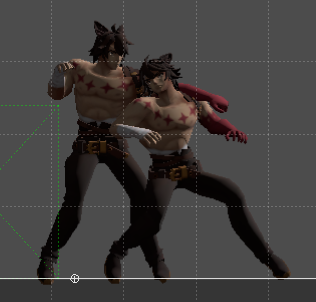
Summer heat is starting here and it’s frying me so I’ll probably be less efficient. I should probably either figure out blocking or physics enveloppes next, hopefully I’m out of those big core features by the end of the week.
Alright, new system is still in development, but it already works at the level of the previous one so let me share some early info!
The old AttackCancel system was just syntaxic sugar over an InputTransition. Works well enough, but there’s many cases where you need to do some extra work, namely for when an attack has prerequisites. Not really an issue, but still something you had to keep in mind often.
The new AttackCancel system has two major differences. The main one is that an AttackCancel now holds much more information inside, such as its motion or potential conditions for the cancel, which allows much simpler use. The second is the interface through metadata (which in fact shaped a lot of that system).
The base function is now just AttackCancel(State), with the state holding all the relevant info inside. That means you don’t need to specify an additional motion or check for meter cost and the like, that’s all inside of that little call. As I’m expanding the system, I’ll add more options to override the default values, such as adding an alternative motion for cases like a followup you can also do from neutral. These are not really new capacities, just a new simpler interface for that.
The way you actually use the system is simple: just put some metadata at the top and most of it happens automatically. A lot of the attack system now goes through that. Let’s take a look at a simple attack using an F branch:
+AttackType Light
+AttackDuration 60

F12-15:
	Hitbox(10000, 5000)
endif
Let’s break down some of the parts:
+AttackType is a metadata line, and is the equivalent of AttackRegister from the previous version. It mostly works the same, but the new compiler features allow some extra conveniences, such as easier specification of attack types and the compiler warnings guiding you in the proper direction to make new ones. It will call AttackState and AttackType-[TYPE] (hook) for you.+AttackDuration is another metadata line. This time, instead of waiting until runtime to see the duration of the attack, it now will get it from the metadata, which is going to be relevant for frame advantage computations. The upcoming T branches will set this automatically.+AttackMotion can be used to add as many motions as you want. It is not present here, so it defaults to the state name if it is a motion.Planned upcoming metadata elements are +AttackCost and +AttackRequires, which make the cancel unavailable if the conditions are not met.
Next up here is going to be blocking, and how the attack cancel system will interact with this hitconfirming system. The remaining tasks for this gate are mostly related to the attack system, improving physics, or improving the editor.
Also, forum is back online. If it goes down again I’ll cry. I’ve improved the server config to host additional services in the future (in fact, I’ve already added one two months ago but it’s not ready for public use yet).
Yo, hitstun is properly back. There’s a couple changes compared to the last iteration, some coming from experience, some from the philosophy change, and some from the engine changes themselves.
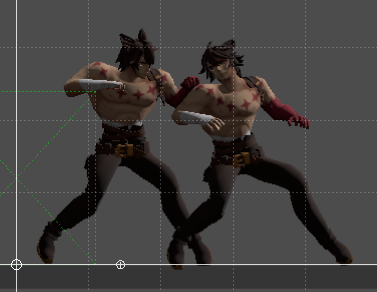
First, Hitstun is now a single state, as opposed to a few. This enables more fluid transitions between ground and air. You can still do special Hitstun states, the order of inheritance is Hitstun -> HitstunState -> StunState -> Common. Blockstun works in the same way.
Another change is that the stun is now stored in a variable that changes, as opposed to being fixed and using the frame counter. This allows more control for advanced changes.
A key change is the number of hooks available. Thanks to the new engine design, it’s very easy to add extra hooks, so ALL BEHAVIOR (or almost all) CAN BE REPLACED EASILY. Each meaningful block is within a hook or separate state, so you just need to find the proper one. Don’t like how the character exits automatically after a time? Change it. Don’t like how stun decreases over time and want to be able to pause it for your weird special move? Go ahead, no need to copy and change, all is done much more directly (and in the future, shown in the editor too). This is something that’s going to be common accross the engine by the way.
Another change that will be explained more when the anim system is more fleshed out, is the different hitstun animations and their system. It is common to want to have multiple basic hitstun animations for various hits, depending both on the character state itself (standing, crouching, airborne), strength, or direction (I do this one a lot). Previous Castagne shyed away from that since it would be very specific to your animations and game, but in an effort to raise the quality of your games this is now planned to be in engine.
A big part of the switch, is the upcoming animation fallback system, which allows animation data to be used from another animation if missing. This allows me to add animation slots with full confidence that it won’t add extra workload on the cases you don’t have it, and therefore I can put as many meaningful ones as I want. This means that the auto-chooser can also know what to work with, as I can make it so you both can choose an animation or let the engine choose the one it deems most appropriate. An example is from Void Fury’s launchers: if the launcher is also a low, it chooses the trip animation, otherwise it chooses the upwards air hit animation. This heuristic works really well and you’ld not notice it often as a user, it’s quite natural in practice.
Some polish is going to be needed, as the editor currently can’t do frame by frame well so I can’t check if everything is showing up properly, and we’re a bit too far from the final test character to autotest it. Will happen with time.
Next up is going to be attack cancels and general linking to the system, then blocking, and then physics enveloppes, which I might need a shorter name for but is going to be very important. And finally, T branches / rich animations and that will be all the main systems for this gate.
Quick update: the base state warning is coming back, this time a bit improved and with proper metadata! Also since at the moment warnings are treated as errors and stop compilation you have to live with it.
So quick refresher, Castagne is very flexible and allows you to call upon other states to add code. This is great, but can result in issues when being careless: you could execute some base code twice, or not at all, which makes for all sorts of cursed bugs, but it’s not something Castagne can just guess. Some states are meant to be used as simple snippets of code to a bigger state, so it is only known to the writer. The previous version had a little failsafe I added a bit later in dev: states could either be marked as helper with _Helper(), or as a base state with _BaseState(), or could inherit from a base state (which unfortunatly didn’t go through the whole tree for various reasons. If not in one of these three cases, a warning would be raised.
In the new version, this helper / game state dichotomy is enshrined: Helper states have a () after their name. This already handles half of the problem, then I’ve also added the new BaseState metadata for the other half. This works much better than before:
I’ve added 4 different warnings with explanations, although here’s the most likely one:
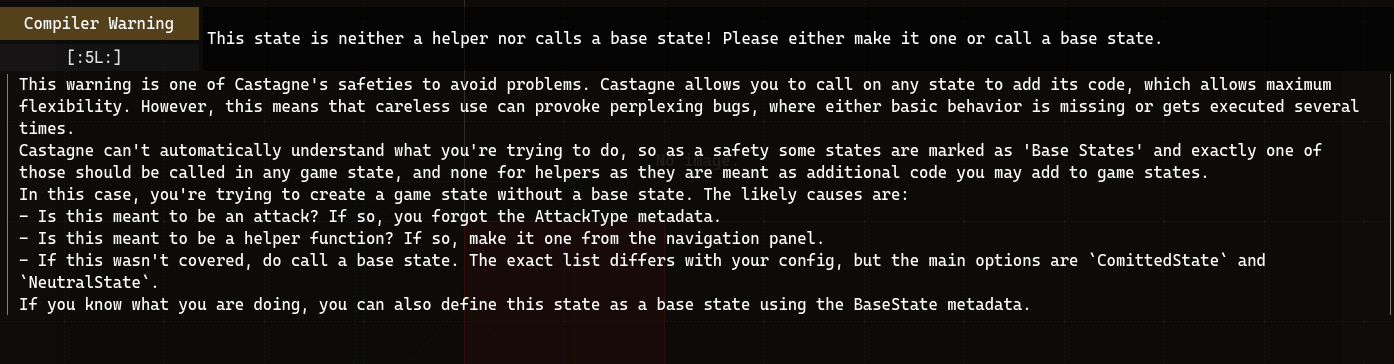
This should result in much cleaner code and more guidance for beginners, and a bit more stability for your own games. When in the last update I talked about doing things properly and taking a bit more time, this is the kind of feature I meant: while not mandatory, implementing it when I feel it’s starting to be needed allows the whole codebase to be more harmonious and stable, and allows me to handle pain points early. I notice a lot of problems when coding the engine, so by the time it gets in your hands the main usage at least should be fairly efficient. Having a strong base also means that bug reports get integrated and treated better, and don’t come back as often.
The hidden news behind this one is that the attack type system is back and better than before, as well as the new attack duration management, but it’s hard to see the whole picture in its current state. Still some big areas to work on systems-wise, but bit by bit they are getting done.
See you next update! I’m mostly building and fixing the whole attack flow right now. Forum and videos are still on my mind too.
NO FELIX LOOK BEHIND YOU!!!!
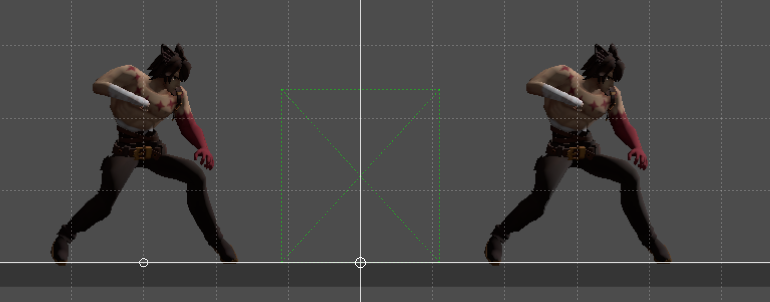
Update is what it says on the tin, you could already do several entities but I’ve properly implemented the Battle Init Data support for variable overrides, which allows them to start on opposing sides.
A lot of updates these days are not super interesting to show in my opinion. From experience people tend to prefer stuff that is relevant to them, so “I fixed the editor having issues with helper states” when you never used the editor is kinda whatever. This has been the bulk of progress these days, small stuff like “input events now delay their consumption so that branches are more coherent in niche cases” that will save a headache to a few people in the future. That’s just programmer life.
Doing stuff properly takes time with very little visibility. The next big step is handling hitstun for example, and while the concept is simple, doing a proper hitstun state that is robust enough to handle various animations and states is much trickier than it seems. Most of the choices will sound like ramblings unless you have a dozen examples on hand lol
Anyway see you soon!
I’ve spent two days to make this, but hopefully it’s worth it. Remember when I talked about making the compiler more robust and the engine more learnable? Take a look at the new errors:
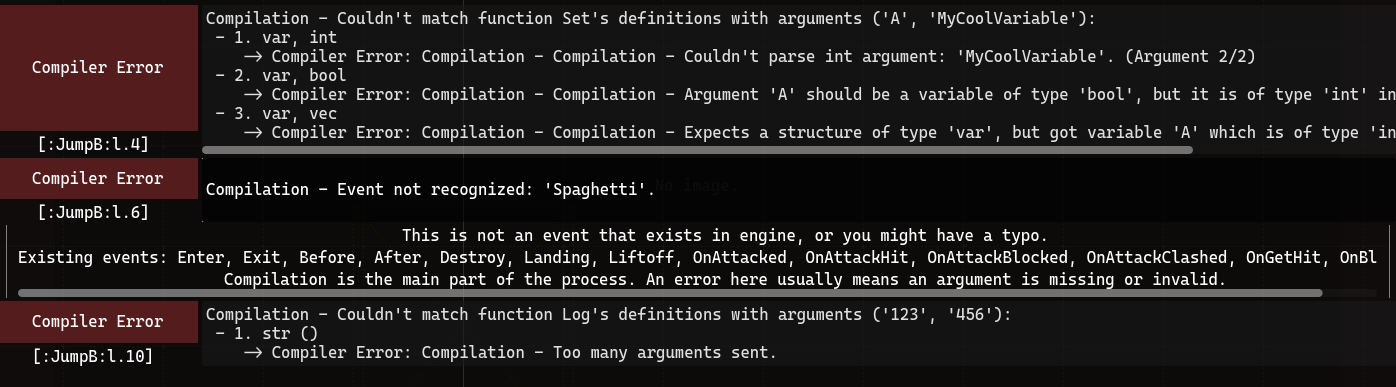
As you can see, errors now are much more verbose. They have categories, and since there’s no space limit anymore they tell you a lot more detail on how it happened. This is already more advanced and useful than the previous version, and the display is nice.
A new thing however, that I added just now, is the ability to ask for a deeper explanation by clicking on the error itself. This adds the little blurb below that can be as verbose as it wants to that you can understand better why the errors happens, and how you can fix it.
This system is not just for compiler errors: it also handles compiler warnings, runtime errors, and the runtime logs. That also means all those can have more information given to them. One such information is the context, which you can see on the compiler error. This helps trace each of these back to the exact line it happened. This is definitely not something that will come up in a later update.
For the record, I have not written error codes for each error yet: there’s a lot and I got annoyed halfway through. Some are a bit context-specific and would require a bigger refactoring to work, and if I’m honest this has been already pretty long and I want to focus on other things. There are currently 38 error codes in the engine for compiler errors specifically, and I’ve written a message and explanation for each one, but there’s probably about as many of them to write on top of it. Now that the system is in place however it will be usable for new errors.
There’s a lot of work still to be done before a release. My tracker says 56 tasks before the first gate, which is not even the beta release. Not all of them are two days mind-numbing endeavors however. This biggest one still remaining is the attack system, including cancels and hitstun and the like. This is a core engine concept now so you have a lot of moving parts to design and handle, but bit by bit it’s going to be done.
There’s also all the surrounding parts I need to get back to: you might have noticed update videos have dried up, because they are pretty long to make even with the tools. Just communicating is taking quite a while, and even a casual update like this one takes 40 minutes to write, and another 20 to post. The forum is also still down, and I’m going to make the config a bit more robust because the website is hosing more and more features now. Anyway, that’s going to be it for today, see you next update!
Alright, back on actual updates! This time, I want to show the new animation system, and a big direction change. Before we start, there’s now a display of the entity’s state and animation in the corner. Take a look:
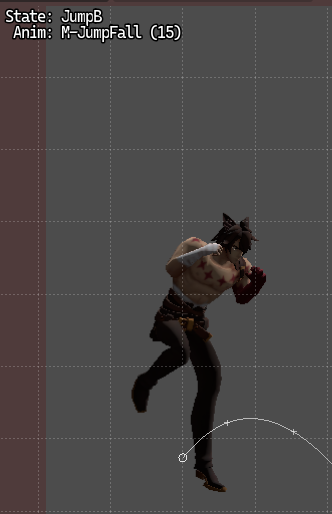
Yep, Baston is going to be retired for a while now as its anims didn’t import properly for some reason. I haven’t made a Bagar model yet but Felix’s anims are quite complete and fresh in my mind, so he’s going in.
While that might look like the usual affair, the internal structure couldn’t be more different. This also shows a new departure in Castagne philosophy: graphics are now going to be more intertwined… in a way. Let’s talk about this direction change.
Castagne was always made to be very confined, and not go further out than needed. It’s part of its expert focus: you ain’t getting more advanced than bare metal engine integration. This has made Castagne very able to do advanced graphics, as you might expect from my profile. This has also polarized the engine a lot in that area, as it scales very well on a skill that is extremely rare in the gamedev space, and has left pretty much everybody else against a wall when they start pushing a bit more. That alone is not cause for too much concern, apart maybe from putting in a default godot-side, but as I’m making more and more fighting games, I am seeing that there’s a lot of cases where I want more direct coupling of the graphics as most attacks and state are extremely timing and animation dependant. Fighting games are after all one of the more kinesthetic genres, and as such you can’t treat graphics (specifically, animation and VFX) as an afterthought. This is why, Castagne will now handle a larger part of the graphics.
This is a huge philosophical departure, and makes a lot of design decisions very subtle. One big difficulty is that a lot of options are extremely dependant on your graphical pipeline. A beginner-focused engine would just make that choice for you, but Castagne aims for high potential and flexibility: I spent 3 years researching line rendering as a PhD, I’m going to use it in my games. I however don’t wish to force people in a janktastic pipeline that’s turbo bleeding edge, but at the same time vanillia godot rendering won’t cut it simply because the FG needs are a bit too different. As such, Castagne will now ship with a custom graphical pipeline focused on tasteful defaults, ease of use, and interesting options. That means you’ll be able to use a fraction of my power out of the box, without having to go meditate under waterfalls. Most users are not going to take advantage of the inherent flexibility of Castagne, and that’s okay. Most games have around the same needs, and the support of some abstractions will stay useful for advanced games too, while not making it mandatory. I’ll speak more about it when it becomes more relevant.
Back on animations. Now that you understand the new direction, how does the Animation system, which has been by design always very barebones, change? Well, Animations are now rich structures. That means that not only they will keep more of their data inside, including semantics, they will also be able to have gameplay impact in the future. What are some of the implications?
AnimLoop anymore where you needed it. The in-engine name can differ from the Castagne name too.Sprite was being able to alter the visuals associated to the frame data easily, but to do the same in 3D would require a lot of finnicky work. Since 3D has one more D than 2D and is therefore objectively superior, this won’t do. This, combined with some upcoming systems, will bring that flexibility to the better graphics option.This will also be supported by a new branch: the Timeline branch. This is going to be the new star of the show, as after making hundreds of Castagne moves (geez) I have found that they have a lot of similarities. The Timeline branch aims to cover like 95% of usecases in a strong and extremely efficient way, and is going to be a joy to work with (for me at least). The design is still being refined, but it will allow Castagne to have its cake and eat it too at the cost of my sanity, as is usual with the engine. The animation system’s full potential will be shown only within that context.
Since it’s already long enough of an update, I’ll say that I’ve reorganized some tasks internally in three gates, a first one that makes the engine usable for everyday dev (= I start using it on my games), a second that can lead to a limited beta (= for the power users), and a third for general release. No ETA, and feature parity isn’t a concern anymore for the nicher functions for release (ie, freecam tool can wait lol, as well as systems that get their meaning when going away from 2D fighters). I still have to mentally process some of the feedback from the jam, don’t hesitate to send me your experiences!
Hey gang! Been a while, for a good reason: I’ve participated in the Indie Fighting Game Jam, as a team lead for a 14 person group! It’s a month long game jam, and there were a total of 60 games submitted. Congrats to everyone!
Our game is called Void Fury! We ended up using the currently available version of Castagne, so you may consider it the Godot 3 version’s swan song.
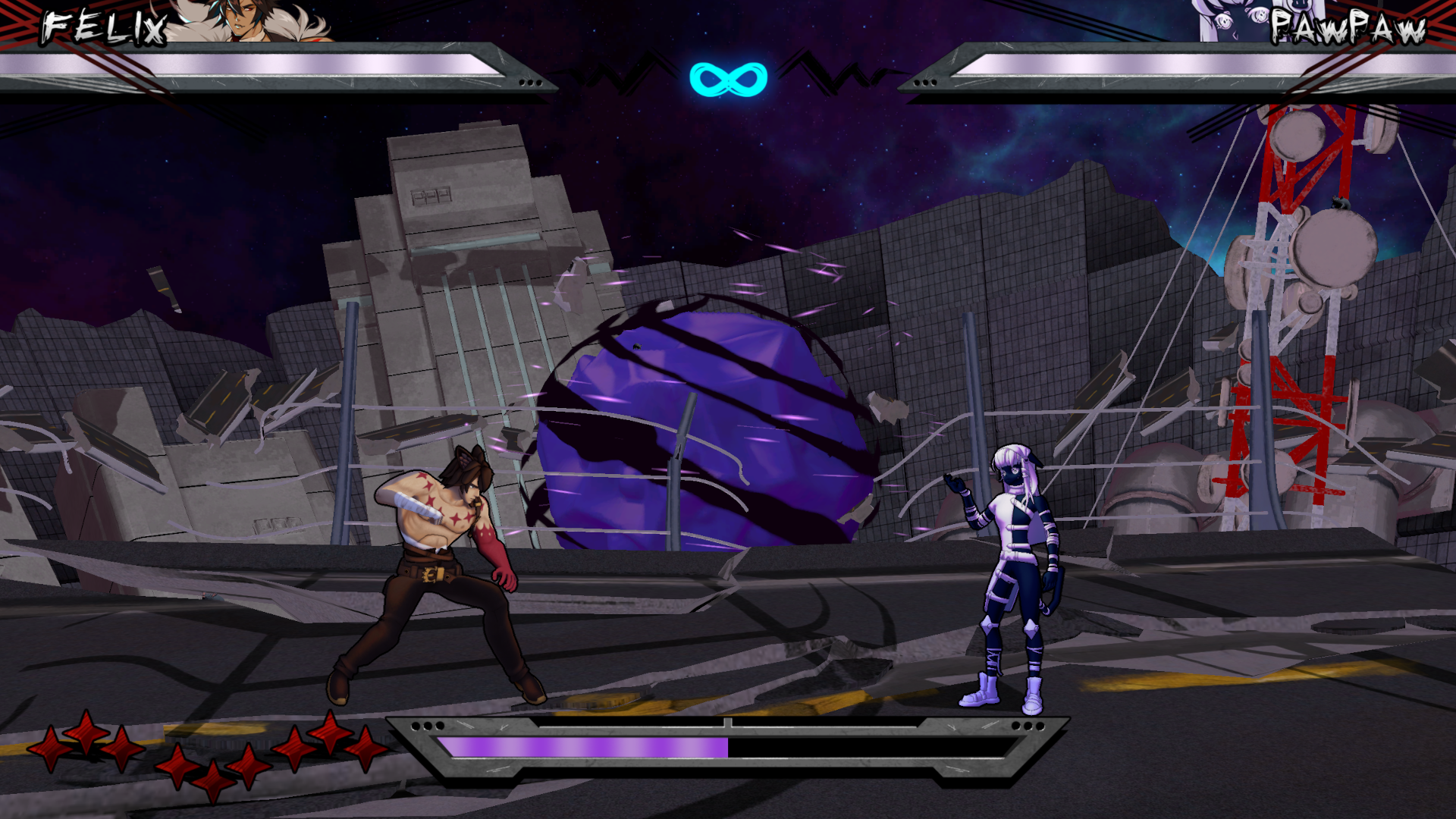
The game has some cool mechanics and some very nice visuals, thanks to the whole team pitching in! It uses a lot of cutting edge rendering techniques, and a lot of Castagne’s flexibility in workflows.
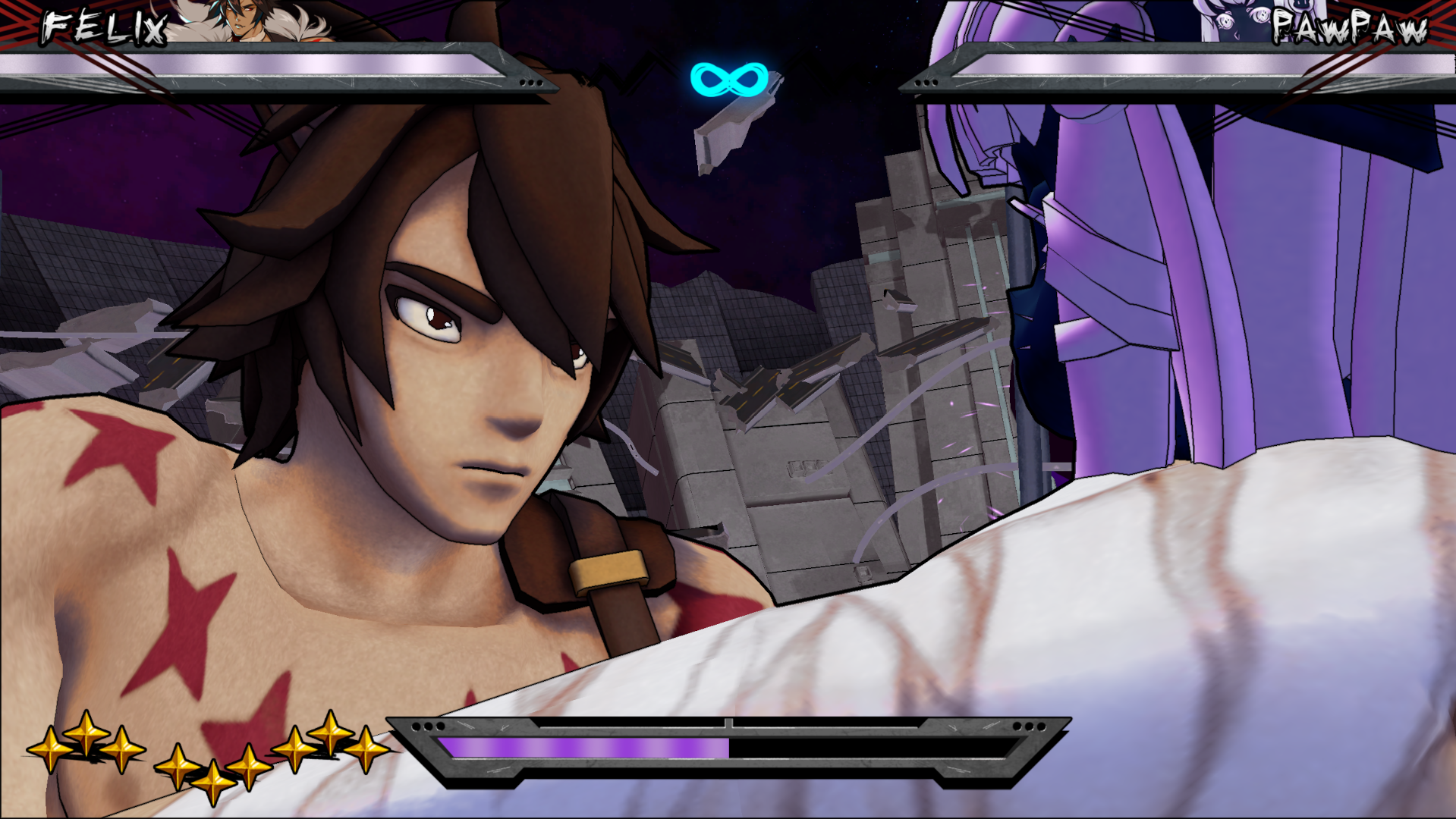
Something that the jam revealed, is that there’s a big gap between how I view and use Castagne, and how the community views and uses Castagne. My approach of Castagne has always been a very expert-focused engine, which was able to reveal its strength in our workflows as it was able to handle everybody pitching in pretty seamlessly. However, this has not been the case with many of the other teams, from what I’ve seen in the community. I think I’ve identified the missing piece, which is that there’s no mental framework really explained at indie / hobbyist level that you kinda end up learning ad hoc when working in the industry.
This has given me some new insights into the design of the new version. I believe my direction is still the correct one, but I am seeing that I’ve been too freeform in my explanations and preferred workflow. Therefore, a way to make Castagne more accessible to all might simply be to hold users’ hands a lot more through many steps, in an even bigger fashion than I envisionned. Castagne has always been pretty contained by design, but I might have to expand on the whole process, as many of the issues people have are at those edges - where you must understand a bit of Godot for example. It’s not possible to cover everything however, and much design time will have to be taken. I think this is one of the cases where the community should step in, and we should discuss on how to improve those aspects and do that work.
Congrats to the other 4 teams using Castagne! Please contact me with your feedback / postmortem on your project, my perspective is only one of many! Also we need to put your games on the roster.
In miscellaneous news: the forum is down because a maintenance by my provider revealed a flaw in the config, and I didn’t have time to fix it. I’ll try to bring it back up in the next couple days!
Remember the Input Transition system ? It’s now called Input Trigger since it ended up doing more than just transitions. That’s it, send update
To add a bit onto the information, the Input Trigger system allows you to add actions when specific inputs are made, the most common of which is a transition to another state, but it could also be a flag so you can do more advanced behavior. It’s a bit more defined in this version:
Before event, and at the end of a tick, in both cases just before a state transition.If you remember, AttackCancel is actually just a wrapper above InputTransition. This means that to reduce input lag as mentioned the last time, the default cancels will now be part of the Before event, and interact with the Freeze phase in a funny fun fun way, which may make them harder to implement properly from within CASP. This is part of the reason why the system will interact with State Metadata, which can be used for more than just categories and the like, but also to specify cancel conditions etc.
Also I’ve renamed the “S” button to “U”, so your default buttons are now L, M, H, U, E. The reason I did that is to avoid confusion between the S(pecial) button and Specials, just like I used LMH instead of the original ABC otherwise people would wonder why the “A” button doesn’t activate the “A” input. Customisation of the input layout is pretty low on the priority list I’m afraid, as it’s much less critical than the engine working lol
Small update because I just wanted to improve a bit on yesterday’s screenshot.
Castagne now also sends the camera information to the editor! This means that the EdSpec viewer now has everything needed to show cool stuff. I’ll add more to it over time, but for now it’s really competent! Also look at the improved trace:
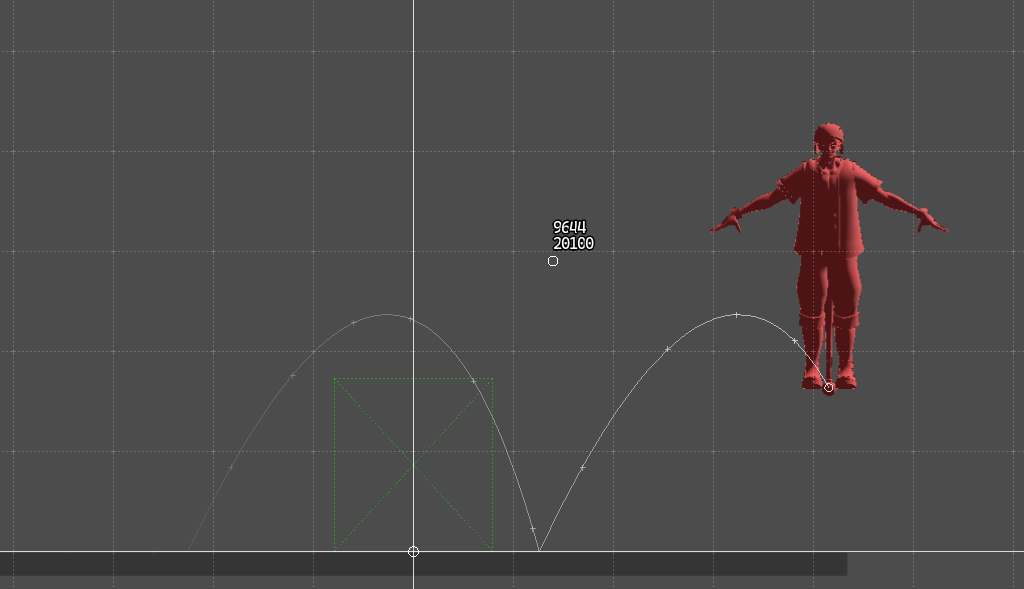
I’ve also started the motion input system. At the moment, the only motion is a single direction, but that’s a start! The system itself is halfway implemented: it can parse simple motion inputs and match them in the input history, but at the moment it’s not hooked to anything. The next step is going to be the Input Transition system, and hooking it back up to it.
Yo, managed to get regular fighting game movement back into the engine, it’s cool
Look I made so it also leaves a trace in the EdSpec viewer, gonna have to hook up the camera to it too later
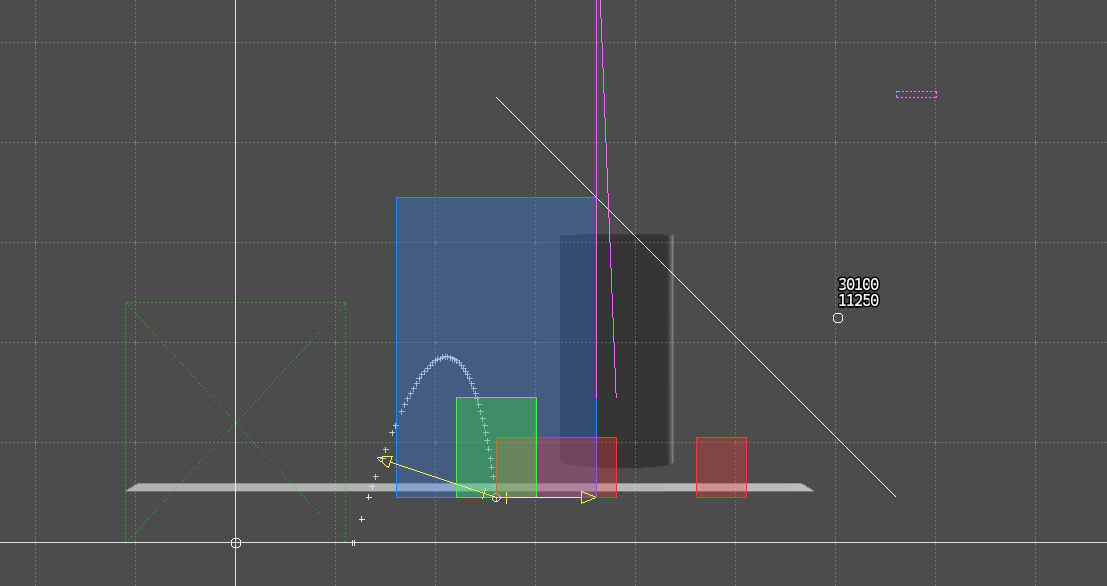
Looks smart and technological therefore the new editor is a million times more advanced
Still writing the base gameplay but better, got some time before all mechanics are online but we’ll see
I’m not sharing much these days since a lot of my improvements are editor-side and unfinished, but I did progress enough to start writing gameplay! And while I’m doing that, I’ve been adding some features. I’ve bundled enough of these in this post to share.
First off: we got some nice syntaxic sugar with handling of else if! It makes some code a lot nicer to read:
I Down:
	V MOVEMENT_StandToCrouch_Time:
		Transition(StandToCrouch)
	else
		Transition(Crouching)
	endif
else I Forward:
	Transition(WalkF)
else I Back:
	Transition(WalkB)
endif
I would have needed a whole more endifs and indentation to write that. You might also have noticed the space between the branch and the condition. It was already working due to how I’ve implemented the lexer, but now that I’ve noticed it I quite like it! The space is optional, but I recommend using it unless it’s something with just a number like F10+:, which also btw now works but it’s not exactly new lol.
Secondly, strings! We already had them in the old Castagne, but this one is different: they are all static, meaning they don’t get changed during execution. This ensures fast speed, as passing a static string is as fast as passing a regular value. This was already in the engine as I’ve been using it for all the Target.Variable stuff, but it’s now available as a proper type. I wanted to delay this implementation to avoid using strings as a crutch instead of more relevant semantic types, but it’s now done and I need stuff like file paths to work.
Finally, I’ve added a new event: Before, which executes at the start of the main phase. This is because I noticed a design flaw during a discussion about engine internals: since I only transition the state at the END of a tick, if you press a button, you’ll only start the attack on the next frame. This effectively adds one frame of input lag. This can be avoided with some tricks that are a bit complex in some cases, but not all. By making an event that allows transition, I can do an early check much more simply, and make many actions have less lag. I don’t think it’s going to be on the mind of most users. Here’s the main phase flow now:
This makes the main phase a bit complex now, but I hope this ends up being manageable. We will see. In any case, there’s now less input lag so that’s good!
I’m still working on a lot of stuff at the same time, I will post other updates when I feel they show enough what I’m going for.
Little update: the game link feature of the editor, which connects to a separate game process, is now much more robust. I’ve done that by fixing two things:
So now, it’s working as expected, at a stable framerate. As always, you can always run it directly. Very nice.
My eyes have been blessed with high framerate, which is nice, but for now I’ll keep the engine at 60 ticks per second. I might add high FPS later, but raising the physics rate itself will destroy online quality, as making it twice as fast requires the computer to be four times faster for the same result, so it would cut a large portion of the player base.
Today, I’m making updates for me. That’s right, it’s the castagne dev experience update, but CASP-side this time.
You know how sometimes you want to make a part of a state easily extensible? Like how I like having WalkF and WalkF-Movement so that you can completely change the movement if you don’t like it? It’s great for the end user, however it’s always annoying to set up: I need to create several states. That’s partially why I added hooks, so that I can “add” these without really doing work, with a simple WalkF-Anim? for example. The issue is that they don’t do anything, therefore if I want to have behavior you can change as opposed to behavior you can add, I still need to go through that process. Introducing:
!WalkF-Movement:
	Move(1000)
endif
As you might expect, it’s just like a hook, except if the hook doesn’t exist it will call on the interior code! That allows these elements to be MUCH cleaner, as all the behavior is in the same state. These have got two particularities:
!!? is mandatory. Good enough imo, it’s added as the base parent so overriding the hooked state works as usual, it’s just a tricky integration that most likely won’t come up unless you start calling on hooks from several states or have several defaults.Another update is that, since the Castagne base files are now embedded inside of the binary, well you can’t really change them. This instantly makes the lock feature of the old editor unneeded since you can’t change it, but that means that I as a dev can’t do that either, which is annoying for development. I’ve therefore added an option where you can give the path to Castagne’s source to load these dynamically!
These updates mostly affect me since I’m the one writing the base CASP files lol. I am making my work environment better so that I can do better work, and I wish to thank me for taking the time to add one of my requested features.
Heyo! I’ve been working in the editor these days, but never had time to share. I’m writing a quick post to share some screenshots.
First off, I’ve advanced enough on the EdSpec compilation and handling to properly handle functions! Every function has its own EdSpec it can add internally, that is different from the one you can attach in the editor.
There’s also handling of colors through a system, and several options out of the box for Gizmos, including lines with caps and boxes with different styles. You can specify boxes in different ways, which match the way hitbox vs hurtbox are handled. In the screenshot below, you can see how Move() now adds an arrow, with a notch. The notch shows one frame, the arrow shows 10, in order to visualise the movement. Boxes show the box where it is.
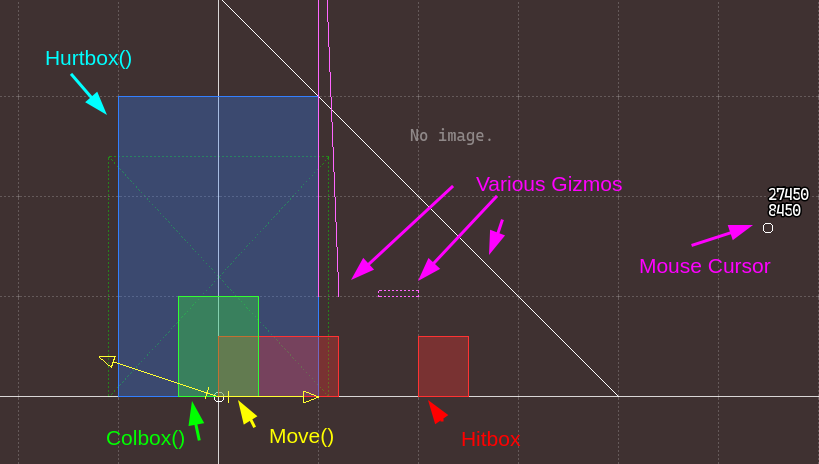
Additionally, I’m working on the UI bit by bit. A lot of it is temporary with big buttons that don’t do anything but take place for future functionality, but here’s the file selection! As you can see there’s a good few more than usual, and it’s gonna get bigger. The rest of the window will help keep track.
There’s still some work to be done editor wise before I can get properly started on the mechmods and base CASP, mostly how to link to the actual Castagne project, and a fair bit of in engine stuff. Stay tuned!
Hey! So I’ve mentioned the EdSpec (which I’ve just renamed from ‘VarSpec’ if you’ve read the previous updates) system a few times, but what is it? Put simply, it’s a refined version of Castagne’s Gizmo, SpecBlocks, and Custom Editors, all put together as a single interface.
At it’s core, it’s a second language right inside of Castagne Script. Don’t worry, most users don’t need to learn it, and it doesn’t affect gameplay in any way, it only talks to the editor (hence the name, EDitor SPECifications.). It’s also way more forgiving, as it always tries to work and doesn’t crash (although you might get funky results). Its main objective is to make character creation in Castagne extremely efficient and fast. Here’s a quick example:
> GLine [0,20000,0] [20000,0,0]
This command, Gizmo Line, will draw a line on-screen at those game coordinates. This is the most basic usecase. A new feature in the editor is that these gizmos can now be drawn on a separate grid, even when the game is not running. Take a look!
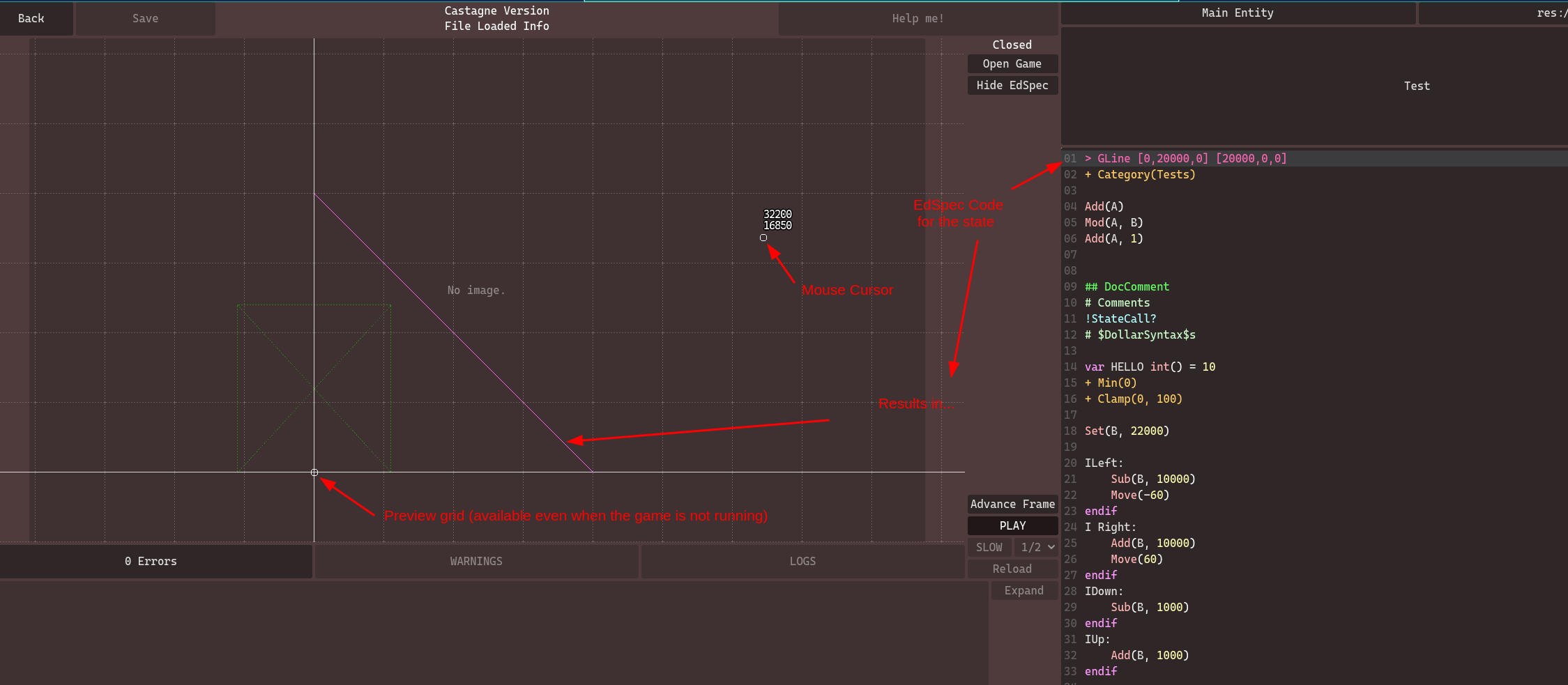
As you can see, the grid is centered at your character, along with a preview of your ColBox. When the game is not running, information available is more limited, but this might also make it more clear. This is something I wish to expand upon in the future, but at the moment it’s already quite agreeable. The mouse is also tracked, which is a slight hint about future abilities ;)
I’ve got a LOT to say on EdSpec, but after writing a very long post yesterday (which I didn’t post), I figured it’s one of those cases where it would be way too much info at once, and actually seeing it will have more impact. So, expect little EdSpec updates bit by bit! What I can say however, is that this is the star of the new version, it put a lot of constraints on the compiler but I sincerely believe it will be worth it. The most impressive features are still on the way!
Also, I noticed just before posting I left some other hints about parts that got implemented in the screenshot. Consider that a bonus preview lol
Hey! I’ve been restarting work on the editor, and the first job is just a straight quality of life update:
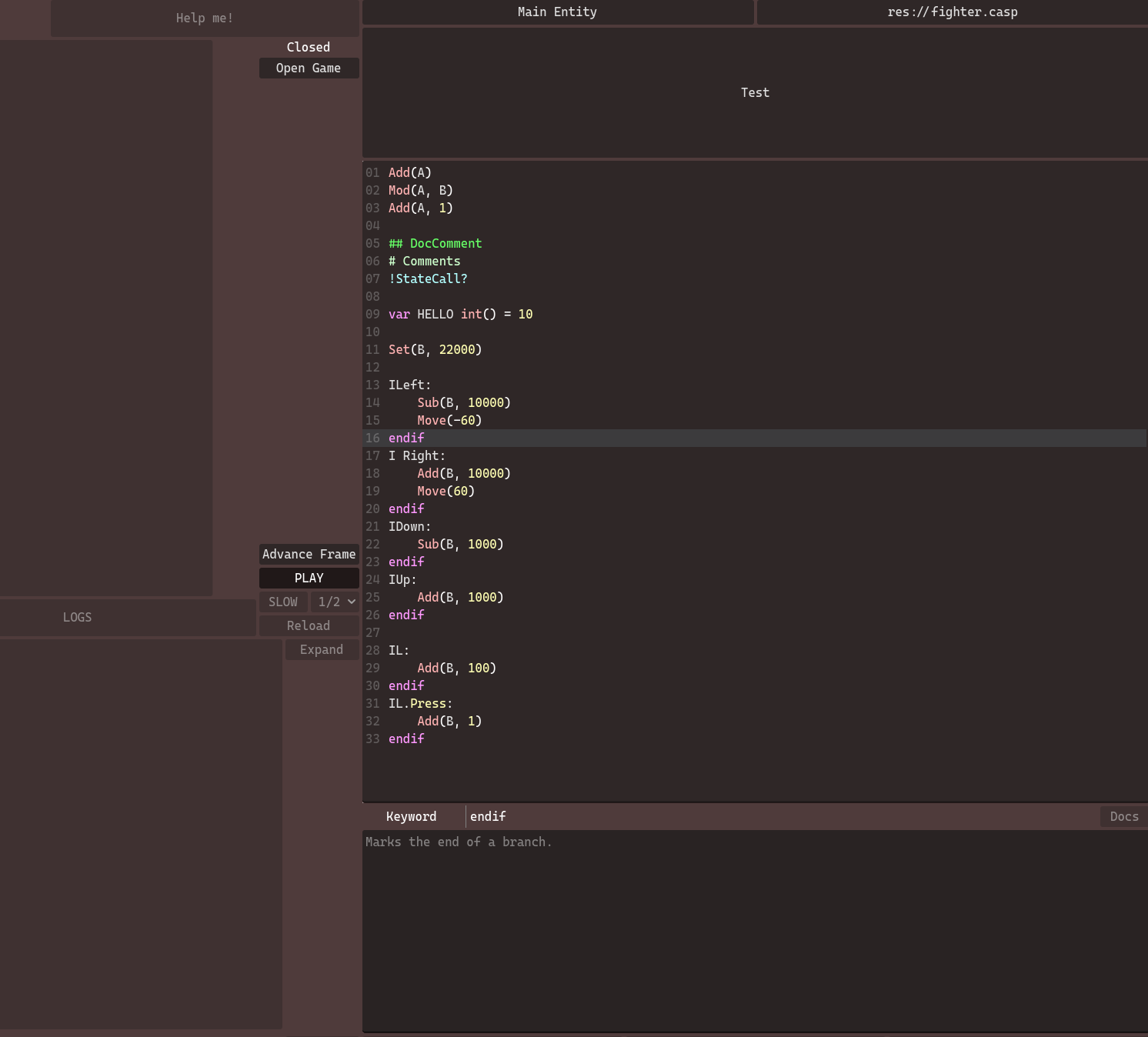
As you can see, there’s now syntax highlighting for Castagne Script itself! The previous one was just coasting off its similarity to GDScript, but this one actually uses the Castagne Script syntax. I didn’t do much, that’s thanks to the Godot team’s efforts mostly, I just told it a couple symbols. Still, that’s a great improvement.
The second one you can see is that the Documentation panel looks a bit different. While that is still a WIP, this one actually adapts to the type of line you’ve selected, with the interface being able to change in the future. Since it doesn’t just read functions anymore, it will be very helpful for beginners as it can remind you what basic elements do, and in general its ability to display more info will be helpful.
Stealth addition that will pay dividends, but the docs here isn’t isolated: there is now a proper Documentation system in the editor, and the panel reflects its contents. This means there is now a centralized location for the docs in-engine, which can be exported on the website. It works off with internal paths, so you can refer to a concept immediately, such as language/branch/input will give you all the detail you need on input branches. This ensures the static part of the documentation is referred properly, and will allow an up-to-date version on the website.
My next editor step is the navigation panel, although the VarSpec system is another key implementation I’ll need to do sooner than later. The roadmap here is a bit less defined, as the editor is still in flux and there are a LOT of systems to make work together.
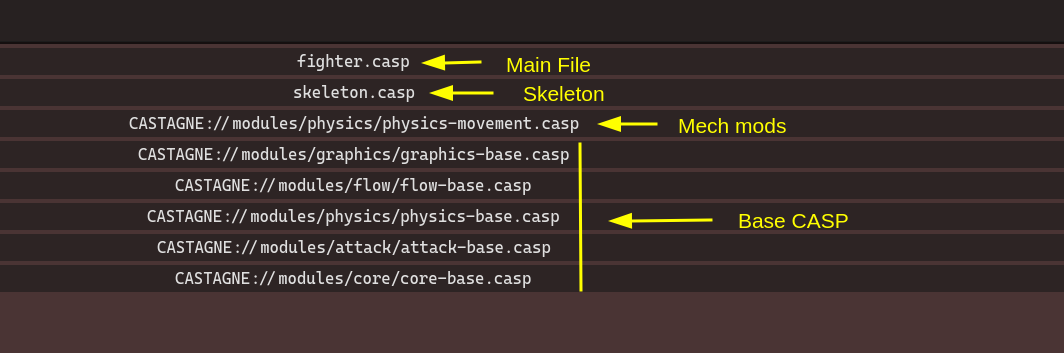
This one is one of the more user-facing additions: MechMods! I’ve finally added the multiple file inheritance. The compiler-side was working, but it wasn’t yet searching for files by itself. ‘Bit more robust than before too. So, what is the general order of files?
The common skeleton and fighter are self-explanatory and were already present before. The difference is in the Base CASP and MechMods, which solve an organizational problem much more elegantly than before, and are one of the most impactful new features in my opinion.
If you remember, Castagne is surprisingly game-agnostic: it just assumes you have entities directed by state machines. In practice, you have a lot of common behavior that got put in the Base CASP, and from there you could rewrite what you didn’t want. As time went on, I’ve added more integration of that base behavior, including visualisations and interfaces (the SpecBlock system), which improves the common usecase but makes the other ones a bit clunkier.
This new organisation goes both ways: on one hand, it makes Castagne more knowledgeable about some game concepts, and on the other hand the other game concepts become much more malleable. I’ve selected some concepts to become core components, for example the dichotomy of Grounded / Airborne, the concept of a combo, hitstun and blockstun, the difference between a neutral state and a comitted state… There’s not that many, but each allows the engine to do a lot more, while also not restricting the ideas you can do much (e.g. you can ignore the Airborne concept if your game has no jump). Many of them are also linked to their module, so for example if you change the physics module you won’t have the Airborne concept.
This allows the MechMods to know much better what they can rely on, and thus focus on key elements. This allows me to separate many common behaviors, such as:
Just based on that, you can see how much more powerful the flow just became. If you want a mechanic in your game, you just enable it and get it immediately, and the interface allows easy access to them. I’m also thinking of allowing MechMods for characters on top of the skeleton, so you could surgically add an airdash to a character.
MechMods are what makes a lot of the new additions I’ve made make sense: the state call hooks (!!? especially) allow extension of behavior without requirement, the helper functions allow definition of new tools like !StandardAnim(Standing), and especially the upcoming VarSpec system. This is the last missing piece for my full vision: a system to allow additional editor integration of CASP tools in a simple way. A big element of the SpecBlocks in the editor was how they allowed very strong integration in-engine through buttons and graphs, and this is now comming to CASP itself! This will push Castagne to new heights, and I can’t wait to be able to use it!
Yo! Another update to a structure you know (and love?): BattleInitData, which as the name implies, holds the data needed to initialize a Castagne fight! Most probably didn’t use it much, but it’s been a cornerstone internally.
There is not much to talk about to be quite honest with you, as the ideas work the exact same, the interface is just better. It used to be an unwieldy JSON dictionary with a weirdo format, now it’s a properly reified object with a functional interface. Here’s an example where I create two players and their character, both have a 100 meter but the second one only has 1 HP.
// Assume we got config, player_1_scripts, and player_2_scripts properly handled before
let mut bid = BattleInitData::new(config);
let character_1 = bid.player().entity(player_1_scripts);
let mut character_2 = bid.player().entity(player_2_scripts);
character_2.entity_override("HP", MemoryEntry::Int(1));
bid.entity_override("Meter", MemoryEntry::Int(100));
As you’ve seen, it is simpler to build, and the previously available functions are there. Overrides allow you to change a variable from the character at creation, and you can set them up to be inherited. As such, the Meter override here was set at the root, so it applied to all entities defined in this BID, while the HP one was only done to a single entity. You can override global, player, and entity variables, as well as create entities with no player parent.
This is still a work in progress, as I’m focusing first on key functionality there. The new idea is that known data can be set more easily in general when the engine knows about it, with simple functions. Here’s an example of a new functionality: instancing subentities directly:
bid.player().entity(scripts).subscript(fireball_subscript_id)
This is honestly fairly low priority compared to other tasks once that the basic functionality is there (some overrides don’t currently work because there’s no player memory yet for instance). It’s needed to set up fights in the editor and game, but at the moment only the first is needed to get started with the engine (as you remember with my priority list). Still, are some planned / potential functionalities:
Next up is multiple file loading for CASP files, as well as Editor control there. It’s time for the Base CASP to get a tune up, and that would already cover most of the prerequisites for the engine!
Big milestone! I’ve advanced the whole engine flow enough so that we now have both physics and attacks working! They kind of go together.
First off: Physics. The new engine is more advanced than the previous one, as it’s made to handle more colliders and both 2D and 3D at the same time. 2D colliders are compatible with 3D and vice-versa, although it’s not what I would recommend to use lmao
At the current moment, it’s at mostly parity with the previous engine. While I could finish it right this week, I know people will want to use the new Castagne for the upcoming Indie FG jam this april, so I’ll be postponning it for a bit to focus on the editor.
Something that is of note here is the interface: the collider functions have changed. While I know this adds additional work for the porting of projects, after tests I’ve seen that this way is a bit better.
Colbox(0,100,0,500) (equivalent to Colbox(100, 500)) will produce a box going from -100 to 100 horizontally, and 0 to 500 vertically, so it’s a simple way to add one to characters.Hitbox(0, 100, 0, 500) (equivalent to Hitbox(100, 500)) will produce a box going from 0 to 100 horizontally, and 0 to 500 vertically. It reflects the more forward-facing nature of hitboxes, and thus allow faster set up.I’ve set it up this way because it also becomes easier to move colliders around from code, as instead of being coordinates it’s now origin and dimension. This makes operations easier, except shrinking a collider forward which is the same difficulty as before. Do note that the order of parameters stays coherent: it’s dimension by dimension, and the shortcuts are (width, height) and (width, base, height) for each function, covering most cases.
This is not fixed in stone yet, so you can discuss it on the forum. Something to note is that I’m planning on adding drag-and-drop in the editor for these, so it should be easier to set up once the editor is more featured.
Some changes on the Attack module front too, although this one is quite tamer. It’s just a slight rework of the attack events, which work as such:
OnAttacked is called on the defender. This is the first event, where most attack overrides will happen. This is before the blocking computation, so you can potentially decide to get hit or not, which is a new ability.OnAttackHit or OnAttackBlocked is called on the attacker depending on the result. The rest of the overrides happen here, and that’s where the attacker gets his meter and whatnot.OnGetHit or OnBlocking is called on the defender. This is where you apply the changes to HP and the like.OnAttackClashed is called on both clashers.All attack events share two properties: the target is the opponent for the attack, and Attack. allows you access to the current attack instead of preparation. This is intended to allow more flexibility in case of multiattacks and to enable more behaviors. Do note however, that the engine doesn’t store recieved/inflicted attacks anymore so you can’t refer to them outside of these events.
There’s more upcoming changes, although this post is long enough and I’m deciding on the details. Something to note, in this whole rework, is that the engine now makes more assumptions about your game, one of the key ones being the ground. The previous Castagne didn’t really care, but this one assumes that being grounded or airborne is a fundamental caracteristic of the game. I like that because you can ignore it if you don’t care, but it allows better integration, which really helps many cases. This is a throughline of the updates.
My next step is to advance the flow module, and to advance the editor workflow. I want the engine to be ready for the jam, although if you want to use it you’ll need strong basics with the previous one. Please get in touch, as this will probably be a closed beta, as it has enough caveats that I don’t want it available without supervision, and instead focus on a polished release. See you next update!
Hey hey! So up until now, the Castagne community was a bit spread around, but especially on Discord. This isn’t always the best for storing information long-term and having transparent discussion, but it was good enough for a while. However, now that Castagne has grown, it’s time to migrate to a proper forum!
You can find a couple things on the forum already:
The Discord will still exist, but I’m going to focus more and more on the forum as time goes on. The forum is going to be the one pushed forward on the website from now on, and there are integrations from the forum to discord.
Little extra info: at the moment the forum is using DiscourseID, since my mail is blocked by gmail (probably previous owner of the IP doing weirdo stuff with it), but I’m hosting it on my own server. When I have the time to properly investigate and fix this, I’ll add the option for local accounts.
Remember that Castagne can be run independantly? It handles all the gameplay on its own, but needs to be hosted by another engine to actually poll input or display anything, which in most cases is Godot. This also means that some data has to be shared, which is the subject of today’s update!
Introducing two new types of data structure to Castagne: ModStructs and HostStructs. ModStructs are an extension of the structures that already exist, they store another Memory Stack and thus can be rolled back if needed. They are separate from the main memory, and live inside of the engine itself, which allows additional abilities where needed.
Currently, this covers the AttackData structure, and you can guess what it’s used for based on the name. The interesting part of ModStructs is that they are also accessible from CASP directly. As such, AttackParam is a thing of the past, you can now directly use Set(Attack.Damage, 1000) for example. It’s also much more flexible than before, as you will be able to declare any type of attack parameter using the declare variable syntax: declare Attack.MyCoolParameter vec() = [0,0,0] creates a new MyCoolParameter attack parameter of type vector. This will still be compatible with the Attack Overrides system, so it’s quite strong!
HostStructs are an extension of ModStructs, as they are one ModStruct plus an additional data structure on the host side. The most direct application is the ModelData structure, which holds the parameters for the model. This is stronger than before on the Castagne side, as you can do Model.Position for example instead of having the whole ModelMove functions. On the host engine side, HostStructs recieve callbacks at key points in the process, such as the graphics update step for models, which are used to handle data while keeping rollback in mind. Since HostStructs have access to this managed memory stack, they can read the correct values and update accordingly, which works better if you use an immediate update structure (meaning, you are not dependant on previous state). The responsability of data lifecycle during rollback will mostly be handled by Castagne, while the responsability of acting on the data is on the HostStruct. This effectively replaces the InstanceData system, which worked in a similar way but was less structured.
Anyway, that’s mostly internal stuff which is going to be useful for engine devs or those that go really far. On your end, it’s most likely buisiness as usual, as you just make your Godot scene and it gets loaded as expected. Or, you use Sprites which are handled for you.
One change that will be coming however as a result is the fusion of the 2.5D fighter and 2D fighter genre into one. This was a big mark of using Godot specifically, and it brought a lot of issues because Godot’s pure 2D engine doesn’t handle 3D models (duh), and as such a lot of default behavior couldn’t be used. Using Godot’s 2D engine won’t be off the table however, as it will become a config option, that way if you want to use pure 2D sprites and background you will be able to set it up.
This change will make the beginner experience much less brittle, and will cause less confusion around some features of the engine which are not available when using the pure 2D renderer as it will be opt-in AFTER the initial approach and ensure you actually know what you’re getting into. Many people think “2D Fighter” refered only to the characters, which is not the case but it’s not something you can “fix”, especially in the first 3 minutes someone has with Castagne. It also prevented the default characters from being used, so the choice most beginners made would cut them off from learning! Won’t happen as much now.
This is a pure banger feature, one of the best usability improvements of the new Castagne. State Calls were a huge feature in the previous version, and you could use it to create behavior either by extending a state or through composition. Interally both were the same, but I added warnings and _Helper() to distinguish between the two. You could alter internal defines, but it was a bit janky.
First off, there’s a new syntax for state names, which immediately distinguishes between the two: StateName is a regular state, while StateName() is a helper state. Both can be called without issues by using !StateName (equivalent to Call(StateName) in the old version), that part doesn’t change. What is new is that you can now add parameters to that, which are treated as local variables! Here’s a long snippet showcasing the new abilities:
:HelperState(var X int(), var Y bool() = true):
# You have access to both X and Y here.

# A is a local variable that you can't set from the outside.
var A int() = 10

V Y:
	Add(A, X)
	!OtherHelper(A)
endif


:OtherHelper(var Z int = 5):
# This has only got access to Z, even when called from HelperState.
# These are copies, so even if called through !OtherHelper(X), it can't change X

# You can call parent with arguments too
!!(10)


:RegularState:
# You can specify parameters with or without defaults
!HelperState(5)
!HelperState(5, false)

# If there are no parameters, these are equivalent
!OtherHelper
!OtherHelper()

# Hooks also work! The parameter list will resolve when needed.
!SuperState?(10, true)
So now you’re either super hype or super confused. This is a core feature of the engine that allows many mechanics and tools to be made inside of CASP in an efficient manner. Let me illustrate the difference with the old Castagne with some examples:
!AirStep(5000) to make the behavior easily readable and contained!!OnLevelUp?. Compared to before, you don’t need to create the state immediately, it will only be used in the characters that want it.!IMPACT or !IMPACT(120) can now take care of everything!!TransitionIfHeld(M, 6, OverdriveMove) to automatically handle moving to OverdriveMove if M is held for the first 6 frames? Easy QoL on something that’s a bit too niche for the modules!FlagCarryover(F) for example, it’s just FlagNext(F) in an L branch. You could make functions like that for your own use in minutes! It’s not as optimized, but that’s easily done later, and you can get started with it faster.This is already super useful, but when you’ll combine it with the upcoming MechMods (!!? is specifically superb in this context, as it allows needed modularity) and Varspec (which can understand when it’s seen from a state call), it will be incredible. These three features are the ones that will bring the editor to a new level and I can’t wait for that!
Slight design musings to finish, since this post is already super long:
Transition(CoolState(500)) or something, but I think it would be a bit overkill in complexity and we can hold variables in memory for that. Maybe I could add a variable tag for that.var X int is valid. The variable tags are optional (the () in int(), which isn’t used for anything right now nor was it before, always a planned feature), and you don’t need to specify a default. In fact, some variable types don’t accept defaults, such as state or flag (semantic types in general), but you may use them in state calls.AttackParam internally. I don’t think this would be for the best however, as it would complexify the docs and make it more confusing to follow. Allowing the ! to become optional would fix that but introduce confusion instead. Making them as CASP functions would allow overriding module functions, which is another can of worms. I’m probably going to introduce module functions as macros to implement that.What’s next is a bit tricky to choose, but I think I’ll start working on the modules again. Logically, I won’t be actually able to implement the MechMods without having something to put in them! Varspec will probably be the very last core feature to be added, since it’s so dependant on the rest.
New feature alert! Whereas before you could only declare constants in your state, now you can declare variables!
These variables are only available for the state (or most likely, scope, due to how I’ve implemented it but I haven’t tested it at the moment), and get reset when going through it again. This means they are volatile: you can’t store state from one frame to another, and you also can’t reference them from the outside.
For the technical detail, it’s a per-entity memory stack that doesn’t get saved or rolled back. It has no upper limit, but it might need to reallocate. It starts at a reasonable size so it probably won’t come up unless you push it explicitely. Its volatility allows it to not bog down the implementation, as it gets “reset” every time you try to execute CASC code.
While it might not sound like a huge thing in the context of the previous versions, it actually enables a lot of future behavior. If you looked at the Base CASP I already used a proxy for them using the RegA/B/C/D variables you might have seen at times. They are usually used in intermediary computations. One such example that I’ll need to convert is F branches, which use it to handle modulos.
The main usefulness however is coming soon: using State Calls as functions, with their own local variables. Previous versions of this were limited and hard to parse, but this time it will be much clearer and integrated. Another benefit that is already in, is shorter compilation times: helpers don’t get compiled anymore so it removes like 80%+ of states. Unsure how needed that was since the compiler is in a compiled language now, but we’ll see when it gets to a higher level. This will be tricky to implement, but I’ve got a fairly clear idea of how I want to do it.
Incredible, but true! I’ve added structures to the compiler, the first of which is the humble Vector! It’s always a 3D vector, even in the 2D settings. You can use them either as a structure, or as individual components:
var V vec() = [0, 0, 0]

# As a component
Set(V.X, 5)

# As a structure
Add(V, [1, 2, 3])
At the moment, this is the extent of the system, but I’m planning on having 3 types of structures:
Vectors are meant to be used in many places in the engine, especially for anything involving Physics or Graphics. I’ve still got design concerns for the other two, namely if the Arrays should have a fixed length (most likely yes), and how Custom structures are meant to be used (just organisation is a bit weak, but I’m thinking it has great potential to replace Specblock structs). Please note that all structures are just in the compiler, and not an actual type in the runtime itself.
I’ve done a lot of design work for the next parts of the engine, as they link a lot with the upcoming systems for top-tier integration in the Castagne engine: Varspec, a second language in the engine for editors, and MechMods, a simple composable way to add mechanics and system mechanics to your game. Combined with the upcoming State Calls with parameters, this will enable tremendous flexibility. That and a basic implementation of Physics, Attacks, and Graphics is my current objective, as this is where I can start porting projects to it.
Also, the forum is almost ready. I’m still testing out the rollout and managed to put myself on a spamlist thanks to a technical error. I guess it happens lol.
I’m really not a webdev dude and it shows lol, but we got a new landing page now! The previous one looked “unique” (better on my screen in my defence) to the point I’m being cited as a part of the “anti-design” movement. You can’t take the artist out of me it seems.
This solves a few problems around communication, the first being that most progress was not really accessible unless you were already in the community. This shows how active the project is a bit better! It was also a bit tricky to keep up with the weekly video, and until its quality improves I believe it’s not currently worth the effort of translating them. So instead of having to spend big time every week, this style of short update is probably better? I was already doing it before, so it’s not like it takes much. Might be able to rig it to videos too, once I improve my pipeline a bit.
One of my next objectives is to move the Castagne community towards this website. Discord was a useful crutch there, but information easily gets lost, and it becomes more walled over time. This is going to happen slowly, as I also want to develop the engine, and being currently mostly a solo thing that means I’m already pressed for time lol. But this is a priority, as my gambit to develop a full engine in 3 months didn’t pan out as fast as I hoped so I’ll need to switch gears into more paced and clear development instead of a short intense period. I’m still very satisfied with the project’s progress, and you can see how many features are already in on the page.
This doesn’t change much my plans, except that March might be filled with more “admin” and “surrounding” work rather than pure programming, but it might make more people aware of the engine, which is nice! My next programming steps are going to be structured types (especially vectors) and either the physics or graphics module. Input already works, so this is some of the last steps to make the engine usable. Knowing the extra features coming, I can’t wait to port my own games to it!
Quick preview of changes:
The syntax is a bit different, check this:
# Assuming L is a button
IL: # Is L currently held down ?

IL.Press: # Is an L press buffered ?
# The buffer lasts around 8f at the moment, and is unbuffered if released
# If going into this branch, the event is consumed.

IL.Press?: # Same as previous, but doesn't consume the press.
I’ve worked a bit too much today to finish the CHECK in time lol so I’m giving a real quick preview
Target.VariableName, peep some examples:
Set(V, Target.V): Copies the value of V from the target inside of our own V.Set(Target.V, V): Writes the value of our own V into the target’s V.AttackDamage(Target.HP): Makes an attack that does exactly as much damage as the target has HP, killing him instantly if it hits!Fixed some bugs there and adjusted behavior to be defined
Subentities will now go to their parent, so the execution order is not shaken too much
CreateEntity and DestroyEntity have been renamed to EntityCreate and EntityDestroy for greater consistency, but I’m also adding aliases ! (they don’t work yet), so you can still write CreateEntity if you want. Gonna be useful when I want to write AttackFA instead of AttackFrameAdvantage
And NEW FUNCTION ! EntityDestroySubentities. Destroys your children. Combine it with EDestroy: to bring your children to the grave with you ! (in castagne)
The only remaining big module feature for the core is inter entity communication and targetting ! After that it’s onwards to the other modules
you can now destroy entities This also triggers a Destroy event so you can spawn one last VFX or something and detach it An entity’s subentities will be promoted to main entities (there’s no difference nowadays anyway except execution order), so you can kill (in the game) with no worries At the moment, there’s a bit of an edge case I haven’t decided on: if you kill a subentity that has subsubentities, should they go to the parent entity or be set free in the wild as strong independant entities? It’s the later at the moment, but I’m not sure if it’s the best course of action Additionally, I’ve decided for After to do what I said, and it now activates after every Action/Freeze/Halt phase has gone for entities and after a data sync but before entity destruction, and doesn’t process new entities created in After. With this, you can do both helper behavior like adding hurtboxes automatically if forgotten, or even synchronize entities a bit more, like tracking to the opponent. IF YOU’RE A REAL NERD THAT UNDERSTANDS WHAT I WROTE REACT WITH :brain:
I’ve added phases and events, compared to previous versions these work properly even with state calls That means that your custom code in states like AttackReactEvents doesn’t need an additional EOnAttackHit: anymore !
Also CallAfter is now EAfter, it’s an event now for easier use
Regarding EAfter, at the moment it’s akin to a second phase after the first, and runs after the inter-entity communication sync. I did it that way now to get it online, but I’m not sure how much of that to keep. I think I’ll remove the possibility of a state transition, but keep the barrier and sync to allow some tricky behavior that requires getting data from the other entities on the same frame
Lil surprise new function FlagCarryover(FlagName)
If the flag is raised, calls FlagNext on it
I use that pattern all the time and figured I might as well enshrine it instead of writing three lines everytime
New CASTAGNE CHECK! Got the editor working properly, onto the core module!
Nouveau CASTAGNE CHECK ! L’éditeur marche bien, c’est l’heure du module core !
Alright we’re in buisiness ! The editor link is now fairly robust (it works in all my tests, even if the engine itself crashes) and the lifetime of the engine is handled by the editor (so you don’t have to think about it) (in your computer the window will be hidden but on mine there’s no “minimize” function in my window manager lol)
Display is calibrated for accuracy rather than exact input, so there a bit (+2f) of input lag. This is due to godot’s rendering delay and only affects the editor. This could potentially be removed at a later time, but this would require a deeper dive into godot’s rendering architecture for something that’s not a priority. You may still test without input lag by launching the game separately (which the editor can also do). This is a bit of a downside of the separate editor, but there’s many upsides like the game crashing not crashing your editor too lol
But yeah good progress, this was one of the big technical issues to solve and it’s done now, the editor is almost usable in production now!
Editor now loads and saves files and projects ! It’s getting close to a usable state ! Main remaining things to go through for a minimum viable editor are:
Castagne CHECK! I reworked the compiler and my brain is fried help
J’ai retravaillé le compilo toute la semaine aled
New Castagne CHECK, this time on the modules! I also introduce the upcoming changes to the physics!
Nouveau Castagne CHECK, cette fois sur les modules! Je parle aussi des changement au module physique!
Actually lets ping @Castagne too because I need you guys to SUBSCRIBE (you don’t need to like, you can hate if you want) so that Youtube knows I’m trustworthy enough to put links and multiple audio dubs
Castagne CHECK #2 is out ! Come get some news on development Today’s subject : Godot 4 and Subentities
Gonna add an @everyone / @Castagne for a quick favor :
PLEASE SUBSCRIBE SO YOUTUBE LETS ME PUT LINKS IN THE DESCRIPTION AND MULTILANGUAGE AUDIO thank u
Castagne Editor now works!!! It uses IPC to allow for better UX and new possibilities (like network, customization, better crash handling…) and it was tricky. It’s fast enough, but can be improved if needed. I finally got the basics down for the project!!!
you gotta know right away
CASTAGNE NOW RUNS INSIDE OF GODOT 4
that’s it, that’s the message Doesn’t look like much (yet) but it does compile a casp file and run it inside of the CastagneEngine node Each time the button is pressed, an engine tick advances, and the state is read back with no issues.
What’s next?
While you might think it’s “just port the rest of the functions”, it’s actually the editor connection. Castagne’s true potential is unlocked by allowing it to serve as a tooling platform, and for that it needs close communication with the editor.
I’m thinking of making the editor a separate program, so that use is a bit simplified and you don’t need to download the full thing every time, or open and close the editor every 5 seconds, as well as permit more advanced features. This is going to be extra tricky however, so I want to nail it early.
The editor being functional will mark the end of the first phase of the compiled castagne rewrite: the core structure. Phase 2 will be continuing development on the core to allow each module to come back, thus building it back into working order.
(I’ll of course make a video like the one from monday to explain more, just give it a bit of time)
@Castagne-SmallUpdates First Castagne check / changelog preview / whatever you wanna call it I’ll try to put some small videos for progress from time to time With the software it’s really quick to make BUT i do need to spend a couple hours to improve it if I can I planned on doing dev today but I got roped into helping out with cursed computer problems lmao https://youtu.be/oklO_x6w5Ag
Starting stream soon! Come for the whiteboard catch up on castagne’s design lol https://www.youtube.com/watch?v=k3s8JSZg82Y
Castagne dev stream: Variables Let’s go, this time I actually slept before lol https://www.youtube.com/watch?v=aprIF_6Ze1U
Hop in, we doing the compiler I’ll only ping @Streaming from now on if that becomes regular, so check the role if you’re interested! https://www.youtube.com/watch?v=VSkvQRiN0AU
As requested by you guys, dev stream for castagne https://youtube.com/live/wEmolGKz8pI?feature=share
Castagne for Godot 4 STARTED TODAY! currently doing setup and writing the design in full the new editor is going to be incredible